
Add External Links to Trello Cards with Ease
Overview
The Knilollert Trello extension is designed to enhance task tracking by enabling users to embed external links directly within Trello card titles. This functionality allows teams using Trello in conjunction with external project management tools—such as Redmine—to streamline workflow visibility. By integrating task-specific URLs into card titles, users can access related records without switching between platforms.
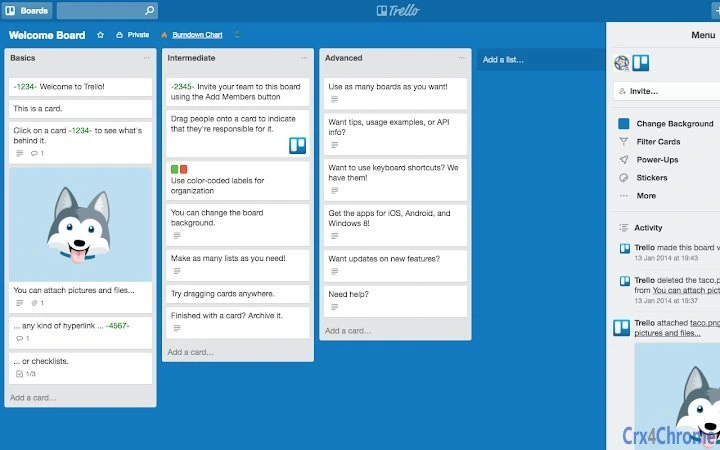
The tool is particularly useful for teams managing multiple trackers, where cross-referencing tasks between systems is common. For example, a developer can reference a Redmine ticket directly in a Trello card by including the task code in braces, such as {1234}. The extension automatically replaces this placeholder with a full URL based on a user-defined pattern.
Target users include project managers, developers, and team leads who rely on both Trello and external trackers for task coordination. The extension operates as a browser add-on, making it accessible across Windows, Mac, and Linux environments. The developer, Knilollert, has focused on simplicity and integration, aiming to reduce friction in task management workflows.
Key Features & Capabilities
- Dynamic Link Injection – Automatically converts task codes enclosed in braces (e.g.,
{1234}) into full URLs based on a custom template. - Customizable URL Patterns – Users can define their own tracker URL structure, such as
https://redmine.com/issues/#{task}, to match their project management system. - Seamless Trello Integration – Works directly within the Trello interface without requiring additional logins or external applications.
- Flexible Placement – Task codes can be inserted anywhere within a card’s title, allowing for natural and readable descriptions.
- One-Time Configuration – After setting up the URL pattern in the extension options, the feature works automatically across all relevant cards.
For example, a card titled Implement login flow {5678} will render as a clickable link to https://redmine.com/issues/5678 when the extension is active. This eliminates manual copy-paste and reduces the risk of broken links. The feature is especially beneficial in environments where task IDs are frequently referenced across documentation, meetings, and sprint planning.
User Interface, Workflow & Performance
The extension’s interface is minimal and focused on configuration. Users access the options panel through the browser’s extension menu, where they can input the base URL for their tracker and define the placeholder format. The UI is straightforward, with no clutter or unnecessary elements, aligning with modern browser extension design standards.
Navigating the extension is intuitive: a single configuration step enables automatic link processing across all Trello boards. The workflow is efficient—once set up, no further user interaction is required. The extension processes card titles in real time, replacing placeholders with active links as the board is viewed.
Performance details were not specified by the developer. However, based on typical behavior of lightweight browser extensions, the impact on system resources is expected to be minimal. The extension does not appear to cache data or run background processes beyond parsing card titles. Stability is assumed to be consistent with standard browser extension operations, though no formal testing data was provided.
Compatibility & System Requirements
The extension is compatible with Windows, Mac, and Linux operating systems. It functions as a browser add-on, meaning it requires a supported web browser (such as Chrome, Firefox, or Edge) to operate. The installation size is 1.2 MB, indicating a lightweight footprint.
Exact system requirements were not listed. The developer did not provide information on minimum browser versions, RAM, or CPU usage. Compatibility with specific Trello features or board types was also not detailed. Users are advised to ensure their browser supports extensions and has JavaScript enabled for full functionality.
Pros and Cons
Pros
- Effortlessly links Trello cards to external trackers using simple syntax.
- Custom URL patterns allow integration with various project management tools.
- Minimal setup with immediate usability after configuration.
- Lightweight size (1.2 MB) ensures quick installation and low resource usage.
- Free to use with no hidden costs or subscriptions.
Cons
- No visible UI within Trello itself—configuration is done via browser extension settings.
- Exact performance impact on browser speed was not disclosed.
- Does not support multiple tracker patterns within a single instance.
- Relies entirely on user-defined URL templates; incorrect formatting may break links.
- Not available as a standalone desktop application—requires browser context.
FAQ Section
Is the extension compatible with all browsers?
The extension is designed for browsers that support web extensions. While specific browser compatibility was not detailed, it is expected to work on Chrome, Firefox, and Edge, which are the most common platforms for Trello access.
Can I use this with trackers other than Redmine?
Yes. The extension supports any tracker that uses a predictable URL pattern. Users can configure the URL template to match their system, such as Jira, GitLab, or custom issue trackers.
Is the extension safe to use with sensitive project data?
As a browser extension, it processes only data visible in the Trello interface. It does not transmit or store any information beyond the user’s configured settings. No external data collection was mentioned in the provided details.
How often does the extension update?
Update frequency was not specified. Users should check the extension’s listing in their browser’s add-on store for release notes and version history.
Can I use this offline?
The extension requires an active internet connection to render links, as it relies on external tracker URLs. However, the configuration and local settings are stored locally within the browser.
Final Thoughts
The Knilollert Trello extension delivers a focused, practical solution for teams integrating Trello with external task trackers. Its ability to dynamically link task codes to external systems through simple syntax enhances productivity and reduces context switching. While limited in scope, it excels in its core purpose: seamless integration with minimal overhead.
For teams using Trello alongside Redmine or similar tools, this extension offers a valuable workflow boost. Its free model and lightweight design make it accessible to individuals and organizations alike. The straightforward setup and reliable functionality ensure that users can start benefiting immediately.
Download Knilollert now and simplify your task tracking workflow.







